

Agent skills are rapidly emerging as a defining innovation for coding agents and AI-powered development tools. Unlike generic prompts or rewriting the same instructions repeatedly, an agent skill serves as a reusable, modular capability file—bundling instructions, workflows, scripts, and templates that empower agents to perform specialised, context-aware, and often deterministic tasks.
As leading platforms like Anthropic’s Claude, VSCode, Cursor, and many others converge on this open skill specification, the way we extend and tailor our AI coding assistants has become more powerful and collaborative than ever.
This post breaks down what agent skills are, why they’re game-changing, how they fit into the larger ecosystem of agent customisation, and practical steps for creating, using, managing high-quality skills in your workflow.
Instruction Methods for Coding Agents
AI is a rapidly evolving technology, and so too are the methods we use to instruct and guide coding agents. As AI-powered development tools mature, so do the strategies for providing them with context, workflows, and direction. Each method offers different trade-offs in persistence, scalability, and developer experience.
- Instructions: Information provided with every prompt. Think of these as one-off, ephemeral directions or clarifications. These are not remembered between sessions or uses. This traditional approach remains the most common for quick interactions but becomes cumbersome for repeated tasks or complex workflows.
- Prompt files: Frequently-used prompts saved for reuse. This speeds up repeated commands or code snippets you use often, but they remain just static text. Popular in early AI tooling, prompt files represent a step toward reusability but lack dynamic behaviour or integration with project context.
- Custom Agents: Customised agent setups that alter core behaviours or inject a specific workflow for every session. These are powerful for enforcing standard procedures or integrating with broader workflows. Emerging in platforms like VSCode and Cursor, custom agents provide persistent customisation but can be resource-intensive and less modular.
- Skills: Modular, reusable capability definitions that can bundle instructions, scripts, templates, or procedures. Skills are loaded opportunistically, meaning they are used only when needed, so they keep your main context window lean, but make advanced logic and automations available on demand. As the newest addition to the instruction ecosystem, skills are gaining traction for their balance of power and efficiency.
Of these, agent skills stand out as the most forward-looking approach, addressing many limitations of earlier methods while enabling new possibilities for agent customisation and collaboration.
What are Agent Skills?
Agent Skills are an emerging open specification originating from the Anthropic team with Claude, designed to give coding agents modular, reusable, and sharable bundles of capability. At their core, skills are directories that contain one or more markdown files – in particular, a SKILL.md that holds both instructions and configuration frontmatter.
What makes skills powerful is their ability to encapsulate all of the logic, templates, supporting scripts, and examples necessary for an agent to reliably execute a task. Skills can easily be version controlled, shared across different projects, and adapted for new environments.
In short, agent skills are bridging the gap between standalone AI assistants and the IDEs where you actually code. Both coding agents like OpenCode and platforms like VSCode or Cursor are jumping on board, making skills the go-to way to customise and extend your coding assistants.
How do Agent Skills Work?
When a coding agent receives a prompt, it checks its list of available skills to see if any might help. The agent reviews the frontmatter of each SKILL.md, focusing on the name and description to quickly assess relevance. If it finds a match, only then will it load the rest of the file, which contains detailed instructions, workflows, and supporting content for that task.
This staged approach means skills are loaded only when clearly useful. Unnecessary instructions stay out of the agent’s limited context window, which keeps responses focused and efficient. This dynamic makes skills very different from more static instruction methods.
Why use Agent Skills?
Agent skills provide a range of practical benefits for both individual developers and teams who want to get more out of their coding assistants.
- Loaded only when needed: Skills are activated as the agent detects relevance during a task. This approach keeps the agent’s context window clean and focused, avoiding unnecessary instruction bloat, often leading to much better results.
- Efficient use of memory and performance: Because only relevant skills are loaded, the agent can process more complex tasks without running into model or session limits.
- Modular and reusable: Each skill is self-contained. You can create, share, or change skills across projects without rewriting prompt instructions or workflows.
- Supports collaboration: Skills, stored as files or folders, integrate naturally with version control. Teams can review, update, or standardise best-practice skills like any other code artifact.
- Bundles supporting resources: Skills can include scripts, databases schemas, or templates. This lets the agent perform highly specialised tasks or output formats with precision.
- Cross-platform flexibility: As more agents and IDEs support the skill spec, investing in skills ensures they work in multiple environments, protecting against tool lock-in.
When should you use an Agent Skill?
A coding agent is capable of performing almost any action you allow: fetching resources, running code, interacting with your terminal, or automating workflows. The real limitation is not what the agent can do, but what it knows how to do. Without explicit instructions or guidance, an agent will often attempt complex tasks and come up short.
Agent skills fill this gap by specifying the “how.” They provide precise workflows, best practices, or domain-specific steps that are defined in reusable files. Think of an agent skill as handing someone a well-tested recipe instead of just saying “make dinner.” Without the recipe, the agent might improvise and produce something that is not edible (looking at you vibe coders).
You should use an agent skill when:
- The agent needs a sequence of clear, reproducible steps to get the task right
- There are specific rules or scripts the agent should follow
- You want outputs that are predictable and safe, not incoherant or hallucinated
- Repetitive tasks need to be automated reliably, not reinvented in every session
If you keep finding yourself rescuing your agent or manually correcting its output for certain jobs, it’s a signal to capture your process in an agent skill.
Enabling Agent Skills in VSCode
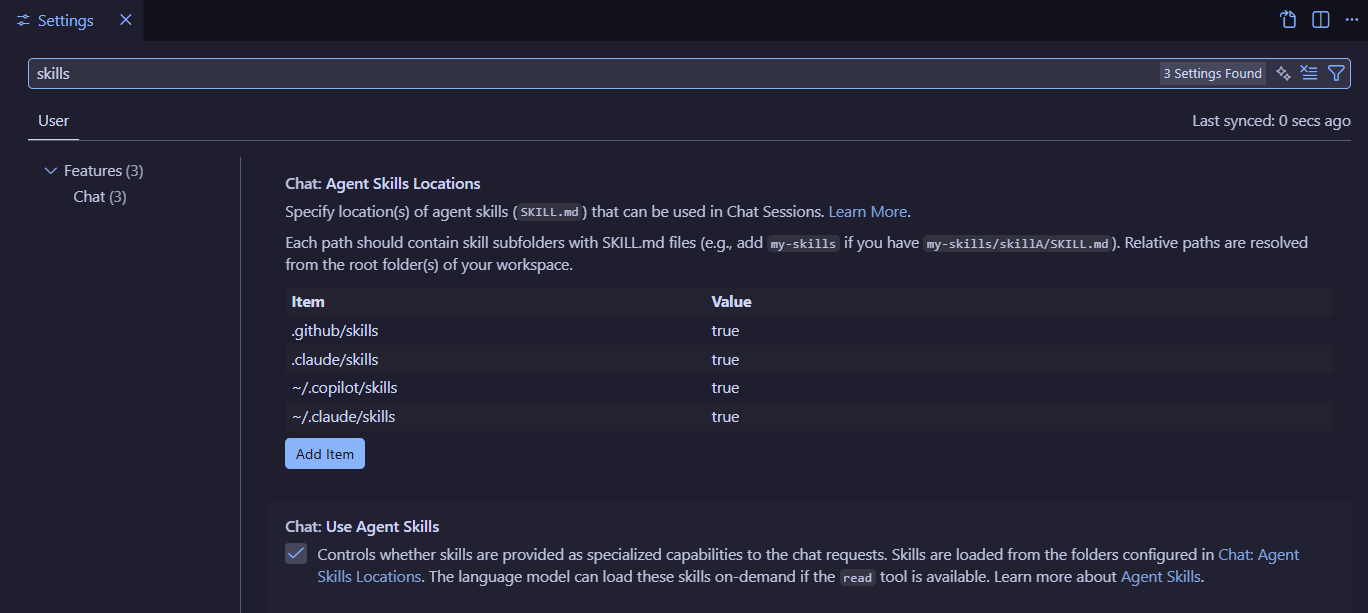
At the time of writing, Agent Skills in VSCode are still an experimental feature and require manual activation.
To enable Agent Skills in VSCode, open Settings (CTRL + ,), search for “skills,” and check the box labeled “Chat: Use Agent Skills.”
Creating a New Agent Skill
To create a new skill in VSCode, make a new directory in the .github/skills folder of your project. The coding agent looks in this location for available skills. If you use a different tool or IDE, the directory may vary; check the documentation for your specific tool.
Inside your new skill directory, create a SKILL.md file. This file will both describe and define the skill you want your agent to use.
| |
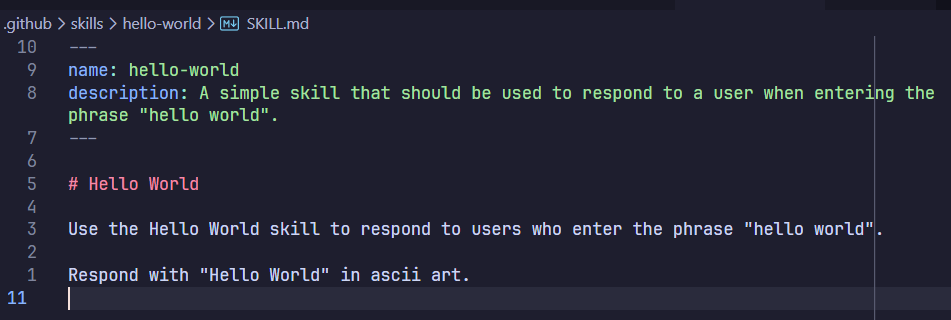
For the SKILL.md file to be recognised by the agent, it should start with frontmatter. Frontmatter is a block of metadata placed at the top of some markdown files, commonly using YAML. In agent skills, this metadata helps the agent identify and load the skill when relevant.
The frontmatter for a skill must contain two fields:
name: a unique identifier for the skill, all lowercase with hyphens instead of spacesdescription: a clear description of what the skill does and when the agent should use it
Below the frontmatter, add your instructions, usage examples, and any guidelines the agent should follow.
| |
Next, write the step-by-step instructions that define your skill. Treat this section like a focused prompt for the agent. Cover what the skill does, how it works, and exactly when the agent should use it. Keep it simple at first, then expand as you refine the skill for clarity and reliability.
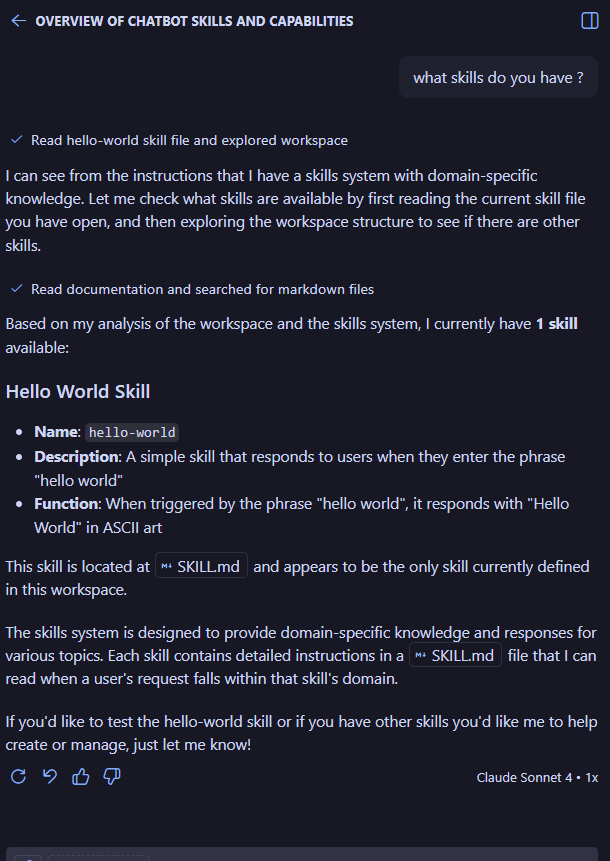
Now if we ask the agent about what skills it has, it can see our new skill.
Using Agent Skills
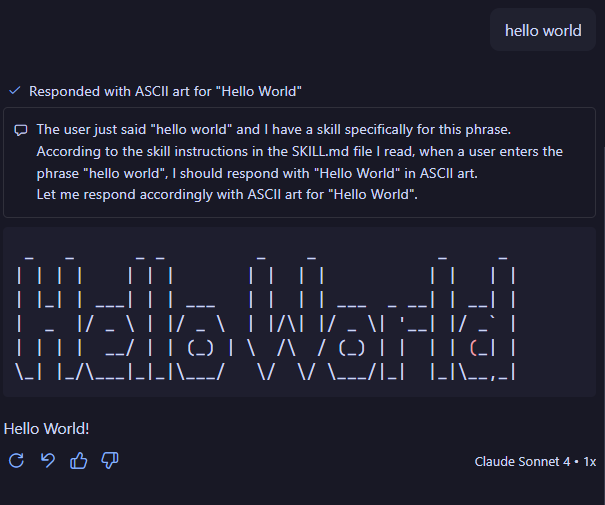
Agent skills use the frontmatter of the skill definition markdown files to determine when it should be used.
In my hello-world example skill, I defined the trigger phrase “hello world”. This means that I can trigger the skill by typing the string “hello world” to the agent
Agent Skill Workflows
A common use case for an agent skill is to have the agent follow a specific set of steps that lead to a desired outcome. To teach an agent a skill for a particular task, you must explicitly define the procedure the agent should follow, step by step. This guidance removes ambiguity and ensures reliable, repeatable results.
Generative Content
Agent skills often enable generative workflows, where the agent leverages its language understanding and reasoning capabilities to synthesize and produce dynamic, context-aware output based on your instructions. Rather than serving pre-defined content, a generative skill empowers the agent to use its inherent GPT capabilities to interpret requirements, reason through solutions, and generate novel responses (custom text, formatted outputs, creative content, or adaptive solutions) by following the procedural steps you’ve outlined.
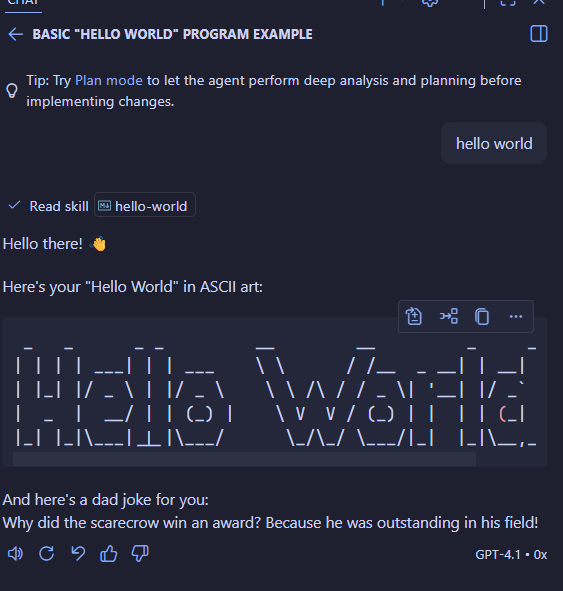
Example: Let’s extend our hello world example by defining a workflow that tells the agent to respond with some generated content.
| |
Whenever a user triggers this skill, the agent will generate each of these pieces on demand, using its generative AI capabilities for the greeting and joke. The step-by-step workflow ensures consistency while still allowing the agent room for creative generation in the specified steps.
Deterministic Content
While generative skills give the agent flexibility, deterministic content does the opposite by specifying exactly what steps or code should be run. By using code blocks in your SKILL.md workflow, you can provide scripts or commands that the agent will execute as part of its response.
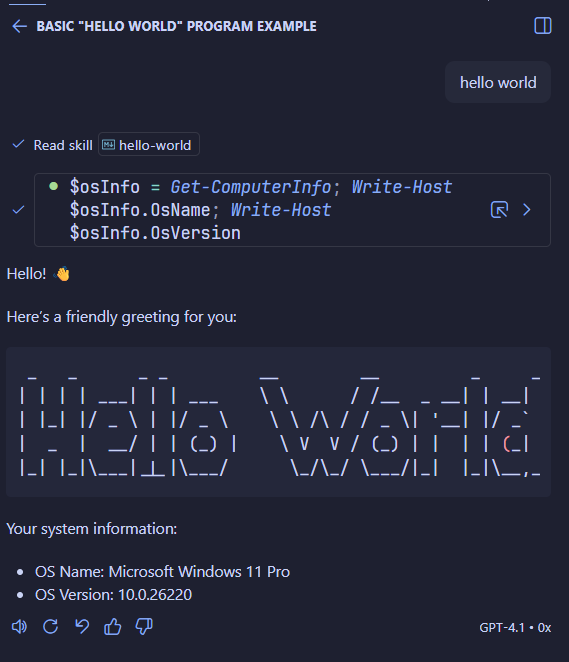
In the example below, the workflow requires the agent to greet the user, show ASCII art, then execute a PowerShell script to gather system information:
| |
This type of workflow lets you combine custom scripting with the agent’s reasoning, so outputs can be both deterministic and context-aware.
Notice in the above example: step 3 provides the PowerShell code explicitly, then step 4 tells the agent to use the script’s result. The instructions are interpreted by the agent, ensuring the correct process is followed and the result is precise.
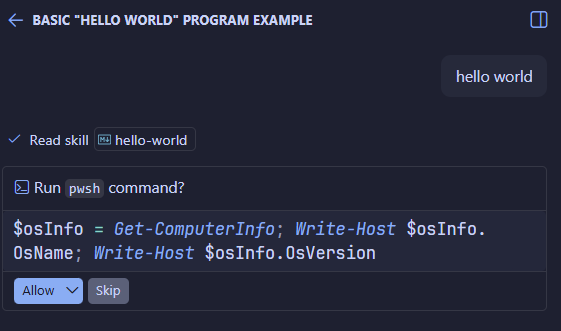
Built in controls ensure that any code blocks in a skill’s workflow are not executed automatically. The agent will only run code that is explicitly marked as executable, and it will ask for confirmation before doing so. This helps prevent accidental execution of harmful code.
Extending Agent Skills with Resources
Skills can quickly become too large and unwieldy if you try to put everything in a single markdown file. This is where resources come in.
Resources are the collective term for supporting files that an agent skill can reference to expand its power and flexibility. By including scripts, templates, or documentation files within your skill directory, you can break up your skill into manageable parts, which enables the agent to perform more specialised tasks with higher confidence and accuracy.
Using resources keeps your main SKILL.md focused on instructions and workflows. Resources are also loaded opportunistically (only when the agent actually needs them), which conserves your context window and keeps information relevant to the task at hand.
Resource Examples:
- Scripts: Executable code files that enable the agent to perform complex, deterministic operations such as retrieving system information, transforming data, or orchestrating multi-step processes. Scripts provide precision and repeatability for tasks that require exact outputs or side effects.
- Templates: Provide predefined output formats to ensure the agent’s responses are consistent and structured the way you prefer.
- Schemas or spec files: Add files such as a database schema to help the agent generate queries or code tailored to your data structure, improving relevance and correctness.
- Reference markdown or documentation: Supply supporting notes or examples to clarify domain-specific requirements or usage.
Example: If your application relies on a custom database schema, placing the schema file inside your skill directory helps the agent understand your specific data structure. This allows it to generate more accurate and context-sensitive SQL queries or integration code.
Resource files can be added by simply placing them in your skill’s directory alongside your SKILL.md, however it is good practice to create separate directories for different types of resources. For example, you might have a scripts directory for executable code, a templates directory for output formats, and a catch-all resources directory for any additional reference materials.
| |
Once resources are added to your skill, reference them in your SKILL.md instructions as needed so the agent knows when to use them.
Example: Script files
We can improve the Hello World skill by moving the PowerShell code snippet into its own script file called get-system-info.ps1, within a new directory called scripts.
| |
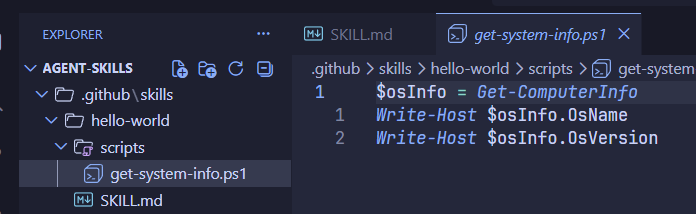
Back in the workflow description in SKILL.md, we can reference the script with markdown link syntax, using a relative path to the new file.
| |
Now when the skill is triggered again we get the same output, but this time it located the script and executed it.
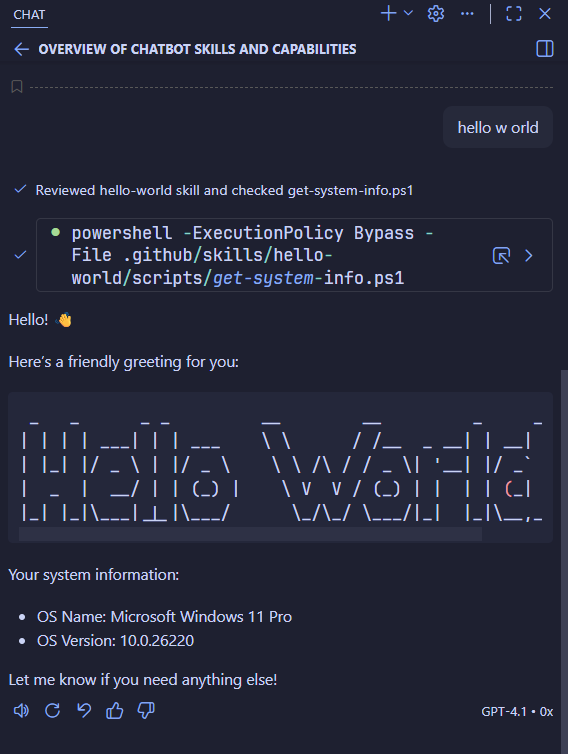
Example: Templates
As your skill definitions grow, you’ll likely need multiple instruction sets for different use cases and scenarios. Rather than cramming everything into a single SKILL.md, you can break up your skill into focused markdown files.
For example, to structure the output in a specific format, you can create additional markdown files that define a template of how exactly you want the agent to output its response.
To get my structured output, I can define a TEMPLATE.md file that defines exactly how I want the agent to output its response.
| |
By taking a modular approach, you can once again take advantage of skills’ opportunistic loading of instructions whereby the instructions only enter the context window when the agent actually needs them.
TEMPLATE.md has no special meaning, other than a clear description of what’s in the file, which makes it much easier for future me to maintain. | |
And finally just update the workflow in SKILL.md to reference the template.
| |
{}. They do not have any significant meaning at all. Considering that the response from the agent will still be generated from a GPT model, the placeholders are just there to indicate to the agent where to put the information. I could have defined those with the text <system info></system info> or [Insert system information here] – it doesn’t matter. All I need to do is tell the agent my intent.When I trigger the agent skill again, the output is now structured to the way it is defined in the template.
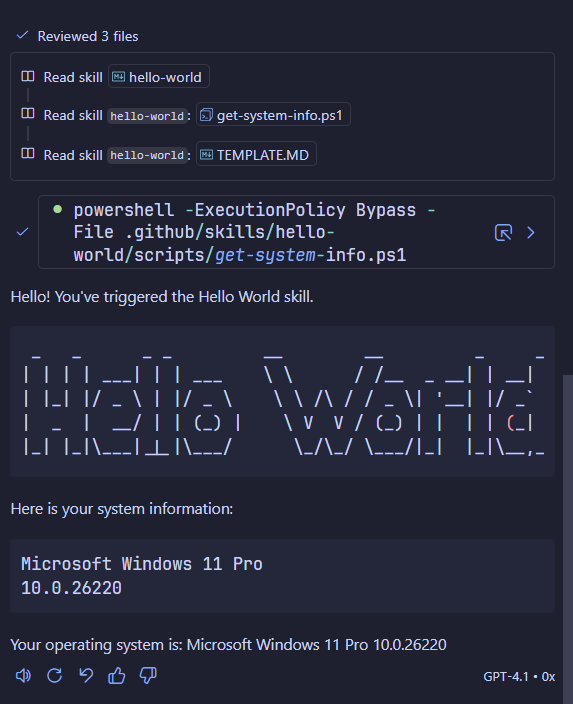
Importing Skills
Because skills are just bundles of markdown files and scripts, they are easy to share, reuse, and manage with version control systems. To import a new skill, simply copy the skill’s files and related resources into your project’s skill directory. That’s it. The agent will automatically detect the new skill and make it available for use based on its frontmatter description.
If you want to get started quickly, check existing libraries and community resources:
Example: Importing a PDF Skill
Let’s say that one day I want to extend the functionality of my Elgato StreamDeck. In order for my coding agent to be able to assist me in doing that, it will need to know the specifics of the API, which may not be something that’s baked into the GPT model.
Lucky for me, Elgato have made their API documentation available, but tragically, it’s difficult to access programatically inside a PDF document.
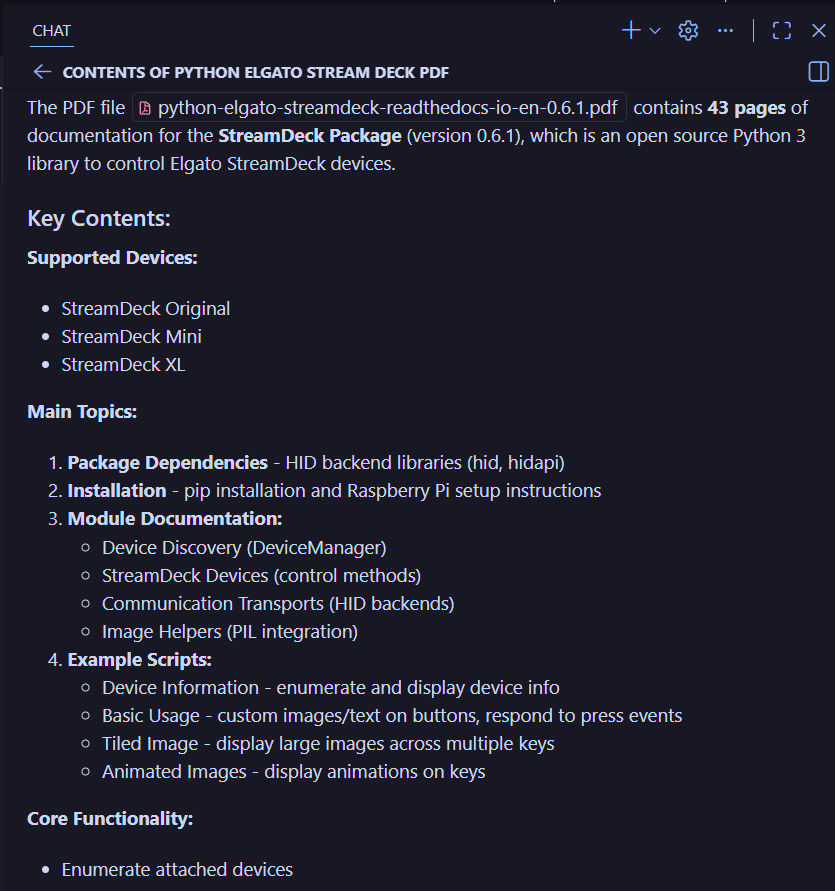
You might think that if I add this as a resource to my project, I can use the agent to ask it questions about its contents, but you’ll quickly find that it doesn’t know how to read PDFs.
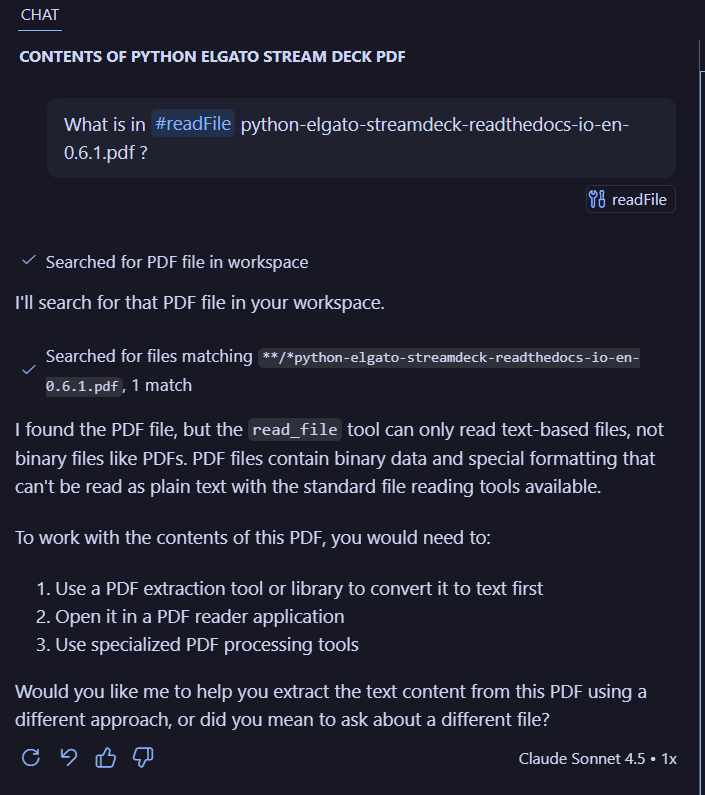
To teach my agent how to read a PDF, I have cloned the Anthropic skill repo to my local machine, and copied across the PDF skill into my skills directory. That’s it. That’s all there is to it.
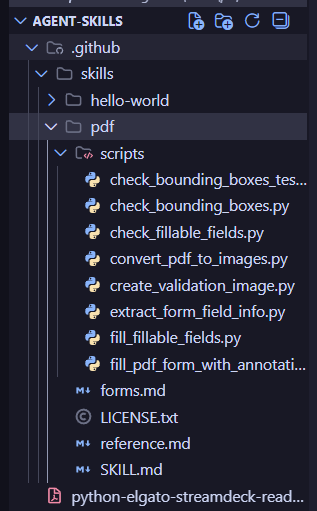
The directory structure here should look familiar.
The skill directory is named pdf (simple and descriptive), there’s a SKILL.md file in the root with instructions to the agent on how to use the skill, and a scripts directory with all the code to be executed to perform PDF functions like read, write, convert etc.
Now when I ask the agent the same question about the PDF, I get a more comprehensive answer.
What makes a good skill?
A well-crafted SKILL.md is critical for producing reliable and effective agent behaviour. To make a skill as robust and helpful as possible, be sure to include:
- What the skill does: Start with a succinct one- or two-sentence summary in the description that clearly states the skill’s purpose.
- How to invoke it: Document when and how the skill should be triggered—this helps the agent know when to load and use it.
- What parameters it accepts: List any variables, arguments, or context the skill expects, so usage is unambiguous.
- What output to expect: Describe the intended results or structure, so both agent and human can confirm the outcome is correct.
- Key examples: Provide sample use-cases or prompts, including edge cases. This helps ground the agent’s responses for typical and uncommon scenarios alike.
The more specific and clear each section is, the more confidently your agents will use the skill and deliver the results you want.
For more detailed guidance and examples, see the Anthropic Reference.
Security Risks
Agent skills, by their nature, may bundle not only prompts but also executable scripts and workflow automation. This makes them extremely powerful, but also introduces real security risks.
Treat any skill you import or copy with the same caution and scrutiny as you would any software dependency or third-party code. Always:
- Review the code in every script or file in a skill
- Understand precisely what actions the skill will perform
- Check sources and maintainers for trustworthiness
- Consider sandboxing or testing new skills in a controlled environment first
Attackers may use skills to introduce malicious commands, exfiltrate data, or compromise your project. Stay vigilant, and never assume that a shared or popular skill is automatically safe.
As with any emerging technology, there are bad guys out there just waiting to take advantage of the hype as I will demonstrate in my next blog post.